76 Unindexed Pages on Our Blog? What I Found Digging Into Google Search Console
I opened Google Search Console and saw "Pages not indexed: 76" staring back at me. Our blog runs in four languages — Japanese, English, Korean, Chinese — so my first reaction was "wait, that many are missing?" But once I broke down the reasons, it turned out most needed no action at all. Here's the investigation, recorded as-is.
Start with the breakdown in the "Pages" report

Panicking over the raw count of unindexed pages is premature. Opening "Pages" in the left menu of Search Console shows unindexed pages broken down by reason. Ours looked like this.
・Excluded by 'noindex' tag: 51
・Discovered - currently not indexed: 17
・Crawled - currently not indexed: 4
・Page with redirect: 2
・Alternate page with proper canonical tag: 2
51 of the 76 fell under "excluded by noindex tag" — by far the largest bucket, so that's where I started digging.
The 51 noindex pages turned out to be "tag index" pages

Clicking the "excluded by noindex tag" row opens the list of the 51 affected URLs. Opening it up, I felt a bit let down (in a good way).
Every single URL followed the same pattern:
・https://www.robin-planning.com/blog/hashtags/Lambda
・https://www.robin-planning.com/zh/blog/hashtags/生成AI
・https://en.robin-planning.com/blog/hashtags/API
These weren't article pages (/post/...) — they were the "list of all posts tagged with this hashtag" pages that Wix auto-generates for every hashtag (#AWS #Lambda #SQS, etc.) attached to an article.
Why 51 built up
The reason is simple: every time we publish an article, we've been tagging it with 5–7 hashtags in each of four languages. Combinations like "#AWS #Lambda #DynamoDB #SQS #CostReduction" stack up fast across 4 languages × number of articles, and the count of unique tag pages balloons quickly.
Is this something to actually fix?
Short answer: no. A tag index page is just a list of links to posts sharing that tag — it has no content of its own. If search engines send traffic to thin, auto-generated pages like this, it can actually hurt the site's overall standing. Wix defaulting to noindex on these was the correct standard behavior.
"Has noindex" doesn't mean "something's wrong." If anything, it's the platform correctly filtering out pages with no value to show in search results. What I learned: don't panic over the raw count — check what's actually on the page first.
What actually mattered: the 17 "discovered — not indexed" pages
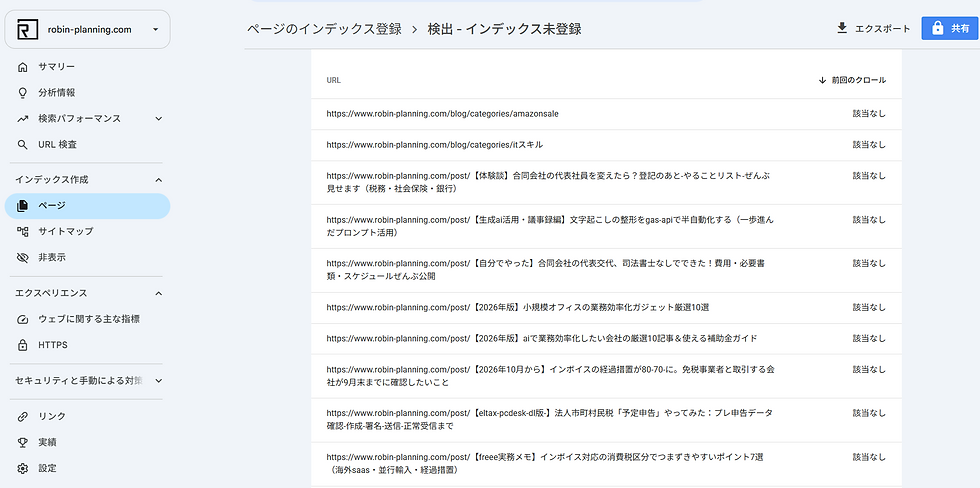
With the 51 noindex pages settled, I checked the remaining reasons. Clicking into the 17 under "discovered - currently not indexed" told a completely different story.
・https://www.robin-planning.com/post/【体験談】合同会社の代表社員を変えたら?...
・https://www.robin-planning.com/post/cloud9を愛して使い続けたけど、いよいよ対処しなきゃいけない。
・https://www.robin-planning.com/post/lambda-のランタイム変更
・https://www.robin-planning.com/post/【2026年10月から】インボイスの経過措置が80-70に。...
This time it was the real deal: 15 actual article pages (/post/...) plus 2 category-listing pages. This was the part that genuinely needed attention.
What "not applicable" means
All 17 had "Last crawled: not applicable." I thought it was an error at first, but digging in, it means: "Google knows this page exists (via the sitemap, etc.) but hasn't gotten around to crawling it yet." Unlike noindex, it's not an active exclusion — just waiting in line.
Now I understood why the count looked alarming. We've published dozens of articles across 4 languages in just a few weeks. Google's crawl frequency is generally allocated based on a site's track record (accumulated update history, past crawl results), so on a newer site with a sudden surge of articles, crawling can't keep up and pages pile up as "found but deferred." It's not a malfunction — it's simply what happens as a blog grows.
Manually requesting indexing for priority articles

Rather than waiting on all 17, I decided to manually request indexing for the articles I most wanted to drive search traffic to. The steps:
1. Copy the target article's URL (an actual /post/... page — not category or tag pages)
2. Paste it into the "Inspect URL" bar at the top of Search Console and hit Enter
3. Confirm the result shows "URL is not on Google"
4. Click "Request Indexing"
5. Wait for "Test complete" to confirm it was submitted
Since there's a daily limit on requests (roughly 10–12 for an individual account), instead of doing all 17, I picked 3–5 — recently published articles and time-sensitive ones like the invoice transitional-measures post.
Things worth watching on a multilingual site
This investigation surfaced a few lessons specific to running a blog in four languages.
・Check for language skew first: when looking at the exclusion breakdown, check whether it's concentrated in one language (en/ko/zh, etc.) — if so, suspect a multilingual publishing setting or hreflang issue
・Tag count multiplies by number of languages: keeping the hashtag count per article lower also keeps tag-page sprawl in check
・Balance publishing pace against crawl speed: newer sites have limited crawl capacity from Google; a sustained publishing burst can pile up "discovered — not indexed" pages
Summary
1. Don't panic over the raw count of unindexed pages — check the reason breakdown first
2. "Excluded by noindex tag" often needs no action if it's thin pages like tag indexes
3. "Discovered — not indexed" is just a queue. Manually request indexing for your priority articles
4. On a multilingual site, check first whether exclusions skew toward one particular language
Search Console numbers can cause more worry than necessary if you don't know how to read them. The biggest takeaway from this investigation: "not indexed" doesn't mean "a problem" — each reason needs to be judged on its own, some requiring action and some not.
If you need help checking your own site's SEO or indexing status, feel free to contact Robin Planning LLC. We can help, drawing on what we've learned running our own 4-language blog.
📚 Related book
Kaisuke Takeuchi/MdN Corporation / Based on data from auditing 1,000 sites, this book lays out an SEO approach that actually delivers results. Good for anyone who wants to go from the basics of indexing (like what we covered here) through to content design, systematically.
* The link above is an Amazon Associate link. Revenue from this blog goes toward running costs.

![[September 2026] AI & IT News Roundup for SMBs|6 Handpicked Stories](https://static.wixstatic.com/media/5b7c68_147333112cfc4639a957819174666aea~mv2.png/v1/fill/w_980,h_515,al_c,q_90,usm_0.66_1.00_0.01,enc_avif,quality_auto/5b7c68_147333112cfc4639a957819174666aea~mv2.png)

Comments